For Ford owners and technicians, FORScan software is a powerful tool for deep diagnostics, module programming, and customization. To harness its full potential, you need a compatible adapter that can reliably communicate with your vehicle’s various network buses. The wrong adapter can lead to frustration, failed connections, or even incomplete data.
This roundup focuses on the best FORScan adapters available, from officially recommended USB models to versatile wireless options. We’ve evaluated them based on compatibility, connection stability, and support for advanced FORScan functions to help you find the perfect tool for your garage, whether you’re a DIY enthusiast or a professional.
Our Top Picks for FORScan Adapters
- OBDLink EX FORScan OBD Adapter
- Vgate vLinker FS OBD2 USB Adapter
- OBDLink MX+ OBD2 Bluetooth Scanner
- Vgate vLinker FD OBD2 Bluetooth Car Code Reader
- OBD2 Adapter FORSCans VINT-TT55502 ELMconfig ELM327 Modified
- OBDLink CX Bimmercode Bluetooth 5.1 OBD2 Adapter
- Vgate vLinker FD Bluetooth OBD2 Scanner for FORScan
- FORScan OBD2 Adapter ELM327 USB Modified for Ford & Mazda
OBDLink EX FORScan OBD Adapter

Often considered the gold standard for FORScan use, the OBDLink EX is custom-designed and officially recommended by the FORScan development team. This USB adapter is built specifically to handle all Ford-specific protocols and modules, providing dealership-level diagnostic access. Its reliability is a key reason for its popularity among serious users.
The adapter features an electronic switch, which is a significant advantage. This allows FORScan to access all Controller Area Network (CAN) buses simultaneously. This capability enables advanced programming and configuration functions that are not possible with simpler adapters that use a manual toggle switch, making complex tasks smoother and more efficient.
Vgate vLinker FS OBD2 USB Adapter
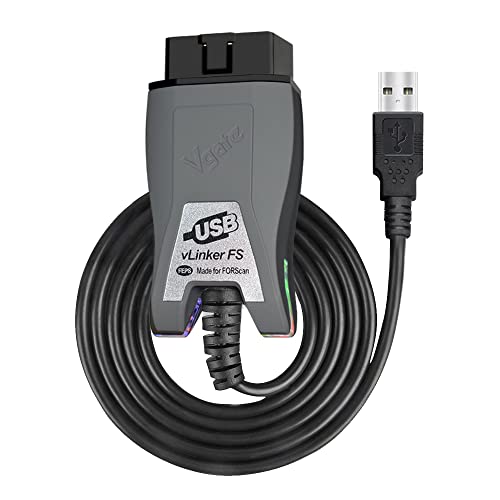
The Vgate vLinker FS is a top-tier USB competitor that is also optimized specifically for FORScan software. It provides a rock-solid, direct connection to your Windows laptop, eliminating the potential for wireless interference or latency. This makes it an excellent choice for critical procedures like module programming where a stable connection is non-negotiable.
Like the OBDLink EX, it uses automatic electronic switching to handle multiple CAN buses. Users report consistent performance and reliable communication with vehicle modules. The vLinker FS supports firmware updates from the manufacturer, ensuring the adapter can be improved over time to maintain compatibility with new vehicles and software versions.
OBDLink MX+ OBD2 Bluetooth Scanner

For users who prefer a wireless workflow, the OBDLink MX+ is a premium Bluetooth adapter recommended for FORScan on Android and Windows platforms. It turns your smartphone or tablet into a capable diagnostic tool, offering flexibility to move around the vehicle while viewing data. Its enhanced OEM support includes deep coverage for Ford and many other brands.
This adapter is known for its robust construction and reliable wireless connection. It supports a wide array of third-party apps beyond FORScan, including Torque and BimmerCode, making it a versatile addition to any toolbox. For Ford-specific tasks, it handles the necessary protocols well, though for intensive module programming, a wired USB connection is often still recommended by experts.
Vgate vLinker FD OBD2 Bluetooth Car Code Reader

The Vgate vLinker FD is a budget-friendly Bluetooth adapter compatible with Android devices and Windows PCs. It performs basic OBD-II diagnostics and supports MS-CAN protocols for Ford vehicles, allowing for some FORScan functionality. This makes it a suitable entry point for users who need to read codes and view basic module data wirelessly.
It is important to note its limitations: it is not compatible with iOS devices, and it does not support the most advanced FORScan system adjustments or control unit programming. The manufacturer clearly states that for full advanced capabilities, their USB vLinker FS model is the better choice. It serves well for diagnostics and monitoring.
OBD2 Adapter FORSCans VINT-TT55502 ELM327 Modified

This adapter represents the modified ELM327 category, a popular choice among Ford DIY communities for many years. It is explicitly designed to work with FORScan, FoCCCus, and ELMconfig software on Windows. The unit includes a physical toggle switch to manually shift between HS-CAN and MS-CAN networks, which is necessary for accessing all modules in many Ford vehicles.
Users appreciate it for enabling a wide range of customizations, often called “mods,” such as enabling global window controls, adjusting tire size parameters, or disabling certain chimes. While the manual switch works, it requires user intervention during scans, unlike the automatic electronic switching of more advanced adapters. It remains a functional and cost-effective tool for many projects.
OBDLink CX Bimmercode Bluetooth 5.1 OBD2 Adapter

The OBDLink CX is a specialist adapter made for BMW and Mini vehicles, officially recommended by the BimmerCode team. Its inclusion here is for Ford owners who also have a BMW or are part of multi-brand workshops. It demonstrates the high-quality build and reliable Bluetooth connectivity characteristic of the OBDLink brand.
This adapter uses modern Bluetooth 5.1 and features easy in-app pairing, an advanced sleep mode, and overvoltage protection, allowing it to be left plugged in safely. While its primary strength is with BMW-specific software, its solid construction and reliable wireless protocol management make it a noteworthy example of a dedicated, high-performance OBD2 tool.
Vgate vLinker FD Bluetooth OBD2 Scanner for FORScan
This appears to be another listing for a Vgate vLinker FD model, emphasizing its use with FORScan software. As a Bluetooth adapter, it provides the convenience of a wireless connection for Android and Windows users. It is designed to handle the basic and intermediate communication protocols required to interface with Ford vehicle systems through the FORScan application.
Prospective buyers should verify the specific model details, as the “FD” designation typically indicates the Bluetooth 3.0 version with Android/Windows support. Confirming the exact capabilities and comparing them to the more feature-rich Vgate vLinker FS models is recommended to ensure it meets your specific diagnostic and programming needs.
FORScan OBD2 Adapter ELM327 USB Modified for Ford & Mazda
This product represents a common type of adapter found online: a modified ELM327 chipset in a USB form factor, tuned for Ford and Mazda vehicles. These adapters are generally the most affordable entry point and use a manual switch to change between CAN buses. They can successfully connect to FORScan and perform many diagnostic and configuration tasks.
The performance and reliability of these adapters can vary between manufacturers. They serve as a functional tool for users willing to work with the manual switching process. For critical programming work, investing in a more robust adapter with an electronic switch and official support is often advised to minimize the risk of connection errors.
How to Choose the Best FORScan Adapter
After testing a bunch of these adapters myself, I can tell you that not all OBD2 connectors are created equal, especially when you need one for FORScan on your Ford. The wrong pick can mean a world of frustration—from failed connections to features that just won’t work. The goal is to get a reliable tool that lets you talk to all your truck or car’s modules without a headache. The main thing you’re looking for is an adapter that fully supports the HS/MS-CAN switch. This is non-negotiable for Fords. This switch lets the adapter communicate across all the different network buses in your vehicle, which is how you access everything from the PCM to the door modules. If it doesn’t have this switch (either physical or automatic), you’ll be locked out of a ton of useful functions.
Next, consider the connection type. I’ve used both USB and Bluetooth/Wi-Fi adapters. A USB adapter, like a straight cable or one that plugs into your laptop’s port, is what I use for serious configuration work. It’s rock-solid, gets power directly from the port, and is what the FORScan team often recommends for stability. Wireless adapters (Bluetooth or Wi-Fi) are super convenient for quick scans and reading codes from your phone or tablet, but I’ve found they can sometimes be flaky for writing changes or accessing some of the deeper modules. They’re great companions, but for major programming, I always go wired.
Build quality matters more than you think. You’re plugging this into a port under your dash that gets kicked, exposed to dust, and faces temperature swings. I’ve had cheap adapters with flimsy casings and loose pins that caused intermittent errors. Look for something with a sturdy housing and a well-molded connector. Also, check that it uses a proven, stable chipset like the ELM327 v1.5 or the STN11xx/12xx series. Many super cheap clones use outdated firmware that can freeze or misreport data. Finally, think about compatibility. While FORScan is for Fords, you might want to use the same adapter with other software. A good FORScan adapter should also work well with general OBD2 apps for basic code reading on any vehicle, making it a more versatile tool in your box.
FAQ
Can I use any cheap Bluetooth OBD2 adapter from Amazon with FORScan?
You might get lucky with basic code reading, but for full FORScan functionality, probably not. Most of the ultra-cheap adapters are ELM327 clones with incomplete or buggy firmware. They often lack proper HS/MS-CAN switching, which is critical for accessing all Ford modules. I’ve tested a few, and they frequently disconnect, fail to read certain parameters, or are outright bricked by deeper commands. It’s worth investing in an adapter known to be compatible.
What’s the difference between the “Extended License” and the free FORScan?
The free version is fully functional for reading codes, viewing live data, and running service procedures. The Extended License (which is free but time-limited and renews) is required for writing changes to the configuration. This includes all the fun tweaks like enabling features (global windows, Bambi mode), adjusting settings, and programming new modules. You need a stable adapter, especially when using the writing functions.
Is it safe to change settings with FORScan? Can I break my truck?
It is powerful, so caution is key. Reading data and codes is completely safe. Writing changes carries a risk if you don’t know what you’re doing. Always, always save your original module configuration (the “As-Built” data) before changing a single byte. I make a backup to my computer and label it clearly. Changing the wrong value in a critical module like the PCM or ABS can cause unexpected behavior. Stick to well-documented changes for your specific model year.
Why does my adapter connect but then fail to read certain modules?
This is almost always a bus switching issue. Many modules on Fords are on the Medium-Speed (MS-CAN) bus, while others are on High-Speed (HS-CAN). If your adapter can’t automatically or manually switch between these networks, it will only see half the vehicle. This is the #1 reason to get a recommended adapter. Also, ensure you’ve selected the correct network interface in the FORScan connection settings (like COM port for USB or the specific device for Bluetooth).
Do I need a Windows laptop, or can I use FORScan on my phone?
The full, official FORScan application is only available for Windows. There is a mobile version called FORScan Lite for Android and iOS, but it’s primarily for code reading and basic data. For all programming, module configuration, and advanced diagnostics, you need the Windows version on a laptop. I keep an old laptop in the garage just for this.
My adapter worked before but now it won’t connect. What should I try?
Start with the basics. Reboot your computer and restart your vehicle. Try a different USB port if you’re using a cable. For wireless adapters, delete the pairing from your computer’s Bluetooth settings and re-pair it. In FORScan, go to the connection settings and re-scan for interfaces. Sometimes, a poor battery connection in the vehicle can cause low voltage, making the OBD2 port unstable. If all else fails, test the adapter on another vehicle to see if the problem is with the adapter or your specific Ford.